Hello, now before I start posing my question I'd like to introduce myself.
I'm Marcus Caecilius, somewhat of a novice when it comes to programming, which is why I am here asking for some assistance.
I'm meant to print out an order. Now printing itself isn't necessarily difficult. But I'm not sure how to design it.
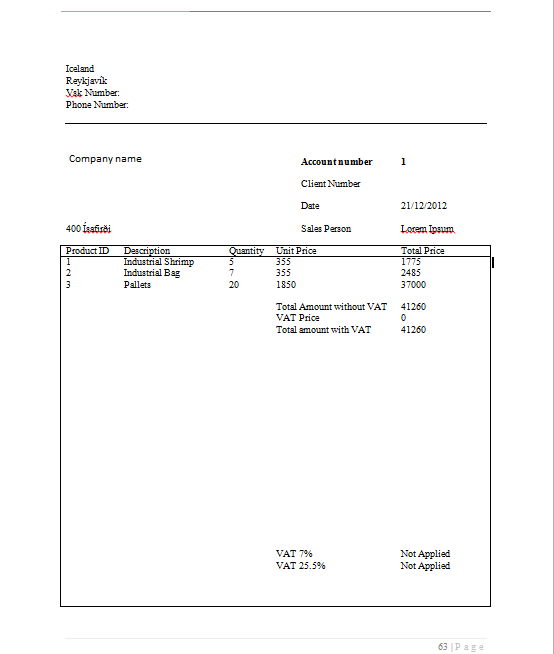
Now I designed this order using Word, it has been cropped a little bit.
![]()
That is some basic code I got in, I'd appreciate any help you could give me that would make my job a little easier because I don't truly know where to begin.
If there is a previous post about the subject that you believe I might find useful I'd appreciate a link to it as well.
Thanks.
I'm Marcus Caecilius, somewhat of a novice when it comes to programming, which is why I am here asking for some assistance.
I'm meant to print out an order. Now printing itself isn't necessarily difficult. But I'm not sure how to design it.
Now I designed this order using Word, it has been cropped a little bit.
Code:
Private Sub btnPrintOrder_Click(sender As System.Object, e As System.EventArgs) Handles btnPreviewReport.Click
PrintOrder.Print()
End Sub
Private WithEvents docToPrint As New Printing.PrintDocument
Private Sub PrintOrder_PrintPage(ByVal sender As Object, ByVal e As System.Drawing.Printing.PrintPageEventArgs) Handles PrintOrder.PrintPage
Dim PaperSize(2) As Integer
PaperSize(1) = PrintOrder.DefaultPageSettings.PaperSize.Width()
PaperSize(2) = PrintOrder.DefaultPageSettings.PaperSize.Height()
PrintDialog1.PrinterSettings = PrintOrder.PrinterSettings
PrintDialog1.AllowSomePages = True
' Show the help button.
PrintDialog1.ShowHelp = True
' Set the Document property to the PrintDocument
PrintDialog1.Document = docToPrint
Dim result As DialogResult = PrintDialog1.ShowDialog()
' If the result is OK then print the document.
If (result = DialogResult.OK) Then
docToPrint.Print()
End If
Static pageNum As Integer
Dim prFont As New Font("Verdana", 24, GraphicsUnit.Point)
e.Graphics.DrawString( _
"PAGE " & pageNum + 1, prFont, _
Brushes.Black, 700, 1050)
e.Graphics.DrawRectangle(Pens.Blue, 0, 0, 300, 100) 'This draws a blue rectangle
e.Graphics.DrawString( _
"Order to Kampi ehf", prFont, _
Brushes.Black, 10, 10)
' Following is the logic that determines whether were done printing
pageNum = pageNum + 1
If pageNum <= 3 Then
e.HasMorePages = True
Else
e.HasMorePages = False
pageNum = 0
End If
PrintOrder.Print()
End SubIf there is a previous post about the subject that you believe I might find useful I'd appreciate a link to it as well.
Thanks.